REST call error ‘The field ‘SiteType’ of type ‘TaxonomyFieldType’ cannot be used in the query filter expression.’

Problem

I have a SiteType Taxonomy field in the “ApproverList” list. I want to filter using the REST call. I get the following error.

“The field ‘SiteType’ of type ‘TaxonomyFieldType’ cannot be used in the query filter expression.”
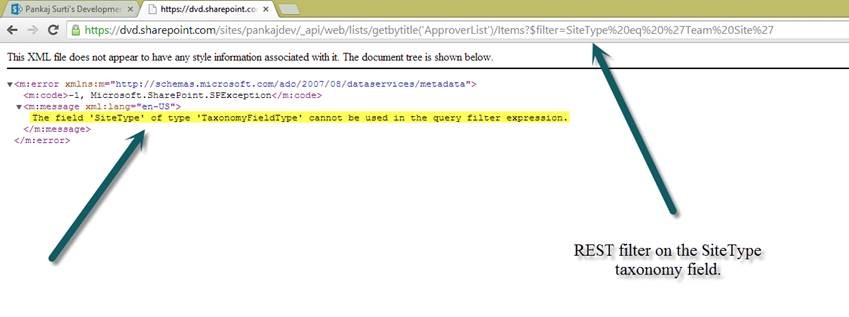
pic1


I am surprised that REST call for taxonomy filed is not allowed. But I found an alternative.


Solution

Here is I have created an alternative solution for this problem.

  • Created a hidden text field for each Taxonomy field. E.g. BusinessUnit will have hdnTxtBusinessUnit
  • Created a workflow for OnItemNew and OnItemUpdate
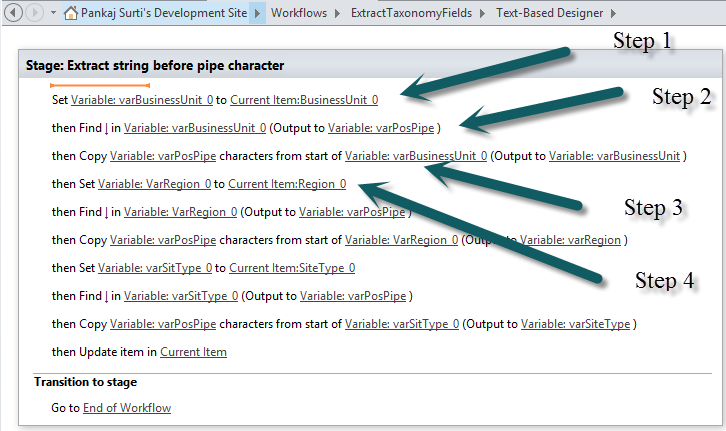
    • Workflow is to find “|” pipe character in the BusinessUnit_0 field.
    • Extract the Term values before the “|” character. E.g. “HR|{guid}” extract HR
    • Update the hdnTxtBusinesUnit with extracted value. i.e. “HR”
  • Now to make the REST quries use the hdnTxtBusinesUnit field.

The following is the screen shot of the workflow steps.
pic2

I hope this helps.


Posted in Uncategorized | 1 Comment

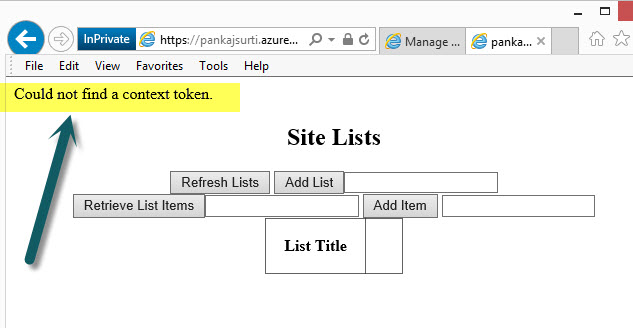
Could not find a context token (provider hosted app on Azure web site)

Problem:

I used the following blog site to host the “sample” provider hosted app on the azure web site.

http://www.sharepointnutsandbolts.com/2013/07/deploying-sp2013-provider-hosted.html

I got an error “Could not find a context token.” I did all the required step in my MSDN O365 Multi –tenant and in the project files.

I tried multiple times, but could not figure out what I have missed in my approach? This should have worked. It drove me crazy.

6-2-2014 4-21-59 PM

Solution:

I traced back all the steps for Client Id and Client Secret. Everything was right but one step in the registering the app I used the “www.” in the App Domain Name field. This was the reason I got an error.


6-3-2014 10-39-31 AM


I hope this helps you, thanks for reading!

Posted in Uncategorized | Leave a comment

Got an Error home Windows 8.1 “Error code: 0x80070035 The network path was not found”

I got the following error for connecting the computer.

“Error code: 0x80070035 The network path was not found”

I used the following instruction and it worked.

Go to Control Panel

Go to Credential Manager on each Windows 7 machine on the network

Under Windows Credentials, type in the name of each machine, username and password

(the original recommendation was here )

Posted in Windows 8.1, Windows 8.1 | Leave a comment

Make sure ONET.XML file type is Element File

I found out by reading the blog from http://technucleus.blogspot.com/2011/02/error-occurred-in-deployment-step.html

Posted in Uncategorized | Tagged | Leave a comment

How to find w3wp.exe process ID for attaching to debug SharePoint project

Use the following command
%windir%\system32\inetsrv\appcmd.exe list wp
Tip: I create a batch file and keep it in my c:\users\{Your login ID}\. So whenever command prompt opens I can run this file.

Posted in Uncategorized | Tagged | Leave a comment

CSS file in the StyleLibrary kept the old copy after deploying the solution

My steps
• I modified existing CSS file in the solution
• Deployed the solution. I saw the file was deleted and updated as new in the Style Library. I saw the date and time as new.
• I checked the pagelayout which uses the CSS did not effect
• I saw the CSS file copy never was updated with my changes.
o I downloaded and saw the copy… no change
o I tried looking in SPD there were no my change
Finally I saw that there is a BLOB CACHE which keeps the copy of the file. The blob cache is defined in the web.config file. This settings needs to be deleted. After that I was able to see the CSS file updating as I deploy the solution.
References:
http://social.technet.microsoft.com/Forums/en-NZ/sharepoint2010customization/thread/baa6e3b6-8f52-4755-8563-78fb29f51484
http://pravahaminfo.blogspot.com/2010/11/configuring-blob-caching-for-sharepoint.html
http://blogs.msdn.com/b/nehajain/archive/2009/05/25/how-to-automatically-reset-clear-the-blob-cache-disk-cache-programmatically.aspx

Posted in Uncategorized | Tagged | Leave a comment

Windows PowerShell Command Builder

I love “Windows PowerShell Command Builder”

http://www.microsoft.com/resources/TechNet/en-us/Office/media/WindowsPowerShell/WindowsPowerShellCommandBuilder.html

Posted in Uncategorized | Tagged | Leave a comment

New PageLayout does not show up as Available pages in UI for creating page

Problem:
I created new page layout in the VS solution and deployed the solution. The new page layout is provisioned in the gallery. It is approved. I cannot see it in the UI as available page layout.

Solution worked for me is to check in the sites “/_Layouts/AreaTemplateSettings.aspx” for “Pages in this site can use any pagelayouts”
Go to Site Settings, under “look and feel” click on “Page layouts and site templates”. Make sure the “pages in this site can use any pagelayouts” is selected.

Posted in Uncategorized | Tagged | Leave a comment

Read about Document Based Database

Going NoSQL with MongoDB
http://msdn.microsoft.com/en-us/magazine/ee310029.aspx
I still need to figure out why? How? When? to use MangoDB like database.

Posted in Uncategorized | Leave a comment

“Windows Phone SDK 7.1 – ENU installation failed” error on Windos 8

I got the “Windows Phone SDK 7.1 – ENU installation failed” I followed steps from the blog.
http://blogs.msdn.com/b/astebner/archive/2012/02/29/10274694.aspx. It helped me.

Posted in Uncategorized | Tagged | Leave a comment