Ignite 2020 Digital Breakout Sessions

Click on the Session code for Video.

Click on the PPT to download the PowerPoint deck.

Video & PPTTitle
DB115
PPT
Be prepared for what’s next: kick start your cloud migration
DB126 PPTMicrosoft Cloud for Healthcare: Empowering health organizations to deliver better experiences, better insights, and better care
DB133 PPTHow to activate Digital Selling: from raw data to insights
DB159 PPTBe a risk management hero with intelligent data protection and compliance solutions
DB104 PPTBuilding a Hybrid data platform with Azure Arc enabled data services
DB112 PPT7 ways to optimize your Azure cost
DB116 PPTAzure IoT services, roadmap and vision: from connected assets to connected environments
DB119 PPTNew innovations on Azure Database for MySQL and Azure Database for PostgreSQL to turbo charge application development
DB123 PPTThe Future of .NET is .NET 5
DB127 PPTFuture of Customer Care: What’s new and what’s next for Dynamics 365 Customer and Field Service
DB131 PPTBuilding systems of insights for enterprise scale with Power BI and Azure
DB135 PPTMicrosoft Dynamics 365 Supply Chain Management for Distribution and Manufacturing
DB157 PPTTransforming the modern workplace with Microsoft Teams platform
DB170 PPTStop managing compliance with spreadsheets! Simplify and extend compliance beyond Microsoft 365
DB101 NO PPTLearn how Lockheed Martin is advancing spaceflight with the HoloLens and mixed reality
DB107 PPTEnable secure remote work quickly with Windows Virtual Desktop
DB129 PPTHow to responsibly scale Power Apps in your organization with a Low Code Center of Excellence
DB132 PPTAmplify your pro developer skills with Power Platform
DB172 PPTSimplify software procurement and management with Azure Marketplace
DB109 PPTMigrate, Modernize .NET applications on Azure
DB110 PPTEnterprise-grade Kubernetes on Azure
DB113 PPTRunning real-time data analytics on the edge with Azure SQL Edge
DB114 PPTExtend Azure management and data services anywhere with Azure Arc
DB141 PPTSimplify work with low-code solutions for Microsoft Teams & Microsoft 365
DB142 PPT Microsoft 365: The foundation of secure remote work for small & medium customers
DB148 NO PPTBring harmony to work and life with productivity and wellbeing insights in Microsoft Teams
DB162 PPTDon’t lose sleep over insider risks! Use the power of ML to identify and reduce your risk today
DB165 NO PPTSave money by securing access to all your apps with Azure Active Directory
DB400 PPTSolving your remote workforce requirements in Azure: How to deploy a highly scalable, resilient WVD environment with ease
DB105 PPT.NET App Modernization and Migration from End to end, using data migration tools and Azure SQL
DB108 PPTAccelerate cloud migration & innovation with Linux on Azure
DB120 PPTFast-Track development of production-ready ML models with Azure Machine Learning
DB124 PPTProtect revenue and drive performance with D365 Finance & Fraud protection
DB146 PPTReimagining work with the Microsoft 365 platform
DB111 PPTBuilding real-time enterprise analytics solutions with Azure Synapse Analytics
DB128 PPTLeverage Microsoft Project and the Project Accelerator to take your projects to the next level
DB145 NO PPTPlaying chess on a trampoline: How to innovate in an era of uncertainty 
DB152 PPTDigitally Transform an Essential Part of your Organization, the Firstline Workforce
DB154 PPTProject Cortex: Knowledge discovery and content intelligence in Microsoft 365
DB137 NO PPTDriving Innovation for Modern Work with Surface Hub and Duo
DB139 PPTWindows 10 innovations for enhanced productivity and resiliency
DB155 PPTIntroducing modern admin capabilities to better service Microsoft 365 Apps for enterprise
DB158 NO PPTEnabling collaboration, communication, and knowledge sharing with Microsoft Teams, SharePoint, Project Cortex, and more
DB402 PPTWhat’s new in the world of Hybrid Cloud? Find out with Nutanix and Azure
DB403 PPTArchitecting the Modern Workplace
DB106 PPTWhat’s new in Azure Cognitive Services
DB122 PPTTransform your Windows Server workloads on Azure 
DB149 PPTMicrosoft Teams Calling Made Simple
DB151 PPTMeet smarter, stay focused, and achieve more with Microsoft Teams meetings 
DB161 PPTImprove SecOps with Azure Sentinel, your Cloud-Native SIEM
DB167 NO PPTWinning Azure Active Directory strategies for identity security and governance
DB102 PPTAzure Databricks – What’s new!
DB103 PPTBuilding AI-powered applications with Azure Cognitive Search
DB130 PPTBuild Agile Business Processes with Power Apps
DB144 PPTOne place for admins to manage Microsoft Teams:  What’s new in Teams manageability
DB153 PPTThe Outlook vision: IT and user value in a hybrid workspace
DB117 PPTUnlock cost savings and maximize value with Azure Infrastructure
DB138 PPTScale and Customize Virtual Meetings and Events with Microsoft Teams
DB147 PPTPower modern meeting experiences across the hybrid workplace using Microsoft Teams devices
DB150 PPTEmployee Engagement and Communities in Microsoft 365
DB160 PPTSafeguard your multi-cloud apps and resources with the latest Cloud Security innovations
DB169 NO PPTZero Trust – the road ahead
DB171 NO PPTAI at Scale: Behind the Scenes
DB121 PPTInnovate with Azure Communication Services
DB125 PPTAutomate your desktop with Power Automate
DB134 PPTDeliver insights where decisions are made with Power BI
DB140 PPTWhat’s new in Microsoft Teams security and compliance
DB156 NO PPTCreating a resilient, inclusive, and hybrid workplace with Microsoft Teams
DB168 NO PPTAzure Active Directory: our vision and roadmap to help you secure remote access and boost employee productivity
DB118 PPTE2E machine learning for enterprises in a secure way
DB136 PPTEmbrace a New Way of Work with Microsoft 365
DB143 PPTBuilding a resilient organization on Microsoft 365
DB163 PPTSupercharge information protection and governance across cloud, on-premise, endpoints, and remote work environments
DB164 NO PPTMicrosoft 365 Defender: Stop attacks and reduce security operations workload by 50% with automated cross-domain security
DB166 NO PPTModernizing your Security Operations
DB401 PPTCustomer Panel: Applying confidential computing with Intel SGX in regulated industries
Posted in Ignite2020 | Leave a comment

Ignite 2020 Pre Recorded Sessions

Session CodeTitle
OD200Introducing Dynamics 365 Customer Voice: Deeper insights. Better experiences. Stronger relationships
OD212Conversational AI powered Customer and Employee Virtual Assistants
OD217Real-time analytics and BI using Azure Synapse Link for Azure Cosmos DB
OD219Running mission critical workloads – like SAPin Azure for business resilience
OD250Build richer meetings experiences with Microsoft Teams apps using new meetings extensibility points
OD256New Microsoft 365 Lighthouse for IT Partners serving small and medium-sized customers
OD271The New Microsoft Stream: Vision, Strategy, & Roadmap
OD278Differentiated protection for Priority accounts in Microsoft Defender for Office 365: Focusing on your most visible and targeted users
OD312Learn how insanely easy Vision AI can enable real time insights for Manufacturing
IGL104A chat about chat bots
IGL125Gathering data from the world
OD213How Delta Lake with Azure Databricks can accelerate your big data workloads by 100x
OD233Build intelligent bots for your employees using Power Virtual Agents and Teams
OD234Connecting Power Apps, Automate, Virtual Agent, and BI with the Common Data Service
OD265Advanced calling capabilities
OD270Virtual health and collaboration with Microsoft Teams in healthcare
OD277Manage a broad range of code of conduct and regulatory compliance risks with Communication Compliance
OD297Search where youre already working with Microsoft Search:  Vision, Strategy, Roadmap
OD304Smart Data Pipelines to Azure: Ingesting and migrating data the DataOps way
OD307Optimizing Spaces with Room Scheduling Planning and Support for Microsoft 365 and Azure IoT
OD326Developing for Customer Engagement with Adobe Experience Platform
OD202Best Practices of Running Cloud Native Applications on Azure
OD222Azure Hybrid Operations and Management Overview
OD241Build custom apps to drive productivity in the remote work world with PowerApps and Teams
OD244Microsoft Dynamics 365 Field Service Scheduling Maturity and Roadmap
OD245Gain insights into usage and performance of your Power BI reports to increase adoption and reduce costs
OD287Adapt, Extend and Integrate your Compliance solutions with third-party data and systems
OD320Closing the Skills Gap with Microsoft Learn and Microsoft Certification
OD201What’s new with the Azure Stack Portfolio
OD215Five questions you should be asking your team about reliability
OD218Azure IoT: Building end to end IoT solutions secured from edge to cloud
OD227Learn about the latest innovations in Azure Stack HCI
OD235Enterprise-grade ETL and data preparation using dataflows
OD236What’s new in Microsoft Dynamics 365 Project Operations
OD242Discover what’s new in Microsoft Dynamics 365 Supply Chain Management
OD255Microsoft Teams Mobile App: What’s new & What’s Next
OD258Enable Business Continuity for your Firstline Workforce with Microsoft Teams
OD269Essentials for managing Microsoft Teams; Advanced manageability controls
OD273Know your data, protect your data and prevent data loss with Microsoft Information Protection
OD279Quickly investigate and respond with relevant data in Microsoft 365
OD292Bridge the gap between HR, IT and business with Azure Active Directory
OD295An in-depth look at intelligently managing insider risks with Insider Risk Management
OD317Ransomware happens: Why Office 365 and endpoints need backup
OD318Three steps to create hybrid cloud with Azure
OD324Policy-Driven Data Management for Azure with Rubrik
OD203What’s New in Azure Compute
OD220Running cost effective big data workloads with Azure Synapse and Azure Data Lake Storage
OD230Azure Monitoring and Analytics deep dive
OD248Enhance your BI solutions with AI
OD260Microsoft 365: Enabling virtual collaboration for the future of our hybrid work environment
OD261Microsoft Teams devices for shared spaces
OD264New admin capabilities to modernize servicing of the Office client
OD276Ninja skills: manage your Conditional Access policies at scale
OD280Detect, prioritize and remediate risk with Attack simulation training and Microsoft Secure Score
OD281Zero Trust for all your users employees, partners, vendors and customers
OD282What’s new in Azure Security Center
OD294The science behind Azure Active Directory Identity Protection
OD303Turning Transactions into People & The Science of Customer Engagement
OD305Veeam & Microsoft: Data protection across datacenters, edges, and the cloud
OD214Resilient DevOps Practices with Code to Cloud automation
OD225Code, collaborate, and ship from anywhere: Meet the Microsoft Developer Cloud
OD226What’s New in Azure Networking
OD231Govern resources across your IT slate
OD238Automate business process with Microsoft Teams with Power Automate
OD246Advancing Power BI Premium for the enterprise analytics market and beyond
OD252Microsoft Edge State of the browser in 2020
OD257Transform your organization with Microsoft Productivity Score
OD262SIDETRACKED: Microsoft 365 admins and IT Pros at Ignite
OD301Resolve Employee Support Requests in Seconds with Aisera & Microsoft Teams
OD308The State of Microsoft Dynamics 365 Customer Engagement
OD313See how intelligent greetings, AR, and real-time technology provide retail solutions for today’s challenges
OD319Top 4 Active Directory Security Issues from 2 Years of Security Assessments
OD207What’s New in Azure Storage
OD249Visio now and beyond
OD266Surface as the Modern Endpoint: Realize the Best of Microsoft 365
OD272Build experiences that customers and partners will love with Azure Active Directory External Identities
OD321Find out why Check Point is Microsoft’s #1 security partner
OD224Azure SQL: What to use when and updates from the Product Group
OD243Discover what’s new in Microsoft Dynamics 365 Commerce
OD254Roadmap to developing enterprise apps on Windows
OD268Managing Security and Compliance in Microsoft Teams
OD298Introducing Azure Defender
OD300Bringing Next-Generation AI Innovation to the Enterprise
OD311Remote Patient Monitoring: Sharing a blueprint to enhance patient care and safety
OD314Supercharging communications and employee engagement with Microsoft 365.
OD315What’s new & coming to OneDrive
OD322The Easy Way to Leverage Spot VMs for Autoscaling Applications in Azure using Elastigroup
OD327Activating Digital Selling with Insights from Dynamics 365 Sales
OD204New to Cognitive Services: Spatial Analysis and Metrics Advisor
OD205Building modern apps with Azure Cosmos DB serverless and Azure Cache for Redis enterprise
OD208Find, try, and buy solutions with ease in Azure Marketplace
OD223Migrate your datacenter with Azure tools
OD228Accelerate your cloud journey with Azure VMware Solution
OD240End-to-end intelligent automation with Power Platform
OD251On Skype for Business? Design your path to Microsoft Teams
OD267Best practices for delivering more efficient and impactful meetings with Microsoft Teams
OD285Govern access for employees and partners with Azure Active Directory Identity Governance
OD302Modern Infrastructure as Code for Azure
OD309Work from Anywhere – Learn how technology is addressing the post-COVID workplace at home, work and school
OD237Building Bots with Power Virtual Agents and extending them with Microsoft Bot Framework
OD274Simplify authentication and authorization with the Microsoft identity platform
OD283Simplify compliance and reduce risk with Compliance Manager
OD290Be the first to know: What’s new in Microsoft Information Governance & Records Management
OD293Integrating on-prem resources in your Zero Trust journey
OD296Azure Defender for IoT including CyberX
OD310Building Smarter Workspaces Using Teams and Azure to deliver workplace automation and intelligence
OD325How to implement full lifecycle security for Azure Kubernetes Service (AKS)
OD210Managing your ML lifecycle with Azure Databricks and Azure Machine Learning
OD211Event-driven Applications with Azure Functions & Logic Apps
OD221Inside Azure Datacenter Architecture with Mark Russinovich
OD229AI customer use cases and learnings
OD232Microsoft Dynamics 365: Commerce & connected store
OD253Introducing Microsoft Graph services
OD259What’s new in Microsoft Endpoint Manager. Part 1
OD263Exchange Here, There and Everywhere
OD284Best practices for hunting across domains with Microsoft 365 Defender
OD286What’s new and what’s coming in Microsoft Cloud App Security with the hyper focus on remote work
OD288Assume Breach! Zero Trust attack response!
OD316Support Remote Working and Deliver Digital First Business with vSphere Powered Azure VMware Solution Infrastructure
OD206Enable successful cloud adoption with Azure landing zones
OD209Protecting remote work and digital experiences using cloud native network security
OD216New Windows Server on Azure Innovations with demos
OD239Empowering your organization with Microsoft Dynamics 365 Customer Service
OD247Microsoft Dynamics 365 Finance: Asset Leasing
OD275Detect Unknown Threats with User and Entity Behavioral Analytics in Azure Sentinel
OD291Azure Active Directory best practices for managing your remote workforce
OD306Host Java EE on Azure Red Hat OpenShift with Red Hat JBoss Enterprise Application Platform
OD323How Vmware Horizon Cloud on Microsoft Azure helps customers quickly scale Windows Virtual Desktop

Posted in Ignite2020 | Leave a comment

How to auto trigger item modified event on a large list using Power Automate?

Problem

I have a large list (named ‘URL2SiteOwnersEmailList’) and want to run an item modified event to all items using Power Automate. This item modified event can trigger a workflow to do some actions on each item.

Step by step Solution:

The First workflow call it kickerFlow to automate to modify items in the large list. You can trigger with manual button.

  1. Create a ‘yes/no’ choice field ‘WFStarter’ on the existing large list. The default value should be No. Also make sure any existing workflow on the large list is currently turned off.
  2. Create a manually button trigger or recursive flow.
  3. Add SharePoint ‘Get items’, (Note: You can create Limit Columns by View to get only ID and WFStarter columns)
Get Items action on a large list
  1. Add Apply Each for the “value” output of the “Get Items”
  2. In the loop add the condition as following. To check whether the WFStarter Flag is null or No.
A condition to check WFStarter is null or false
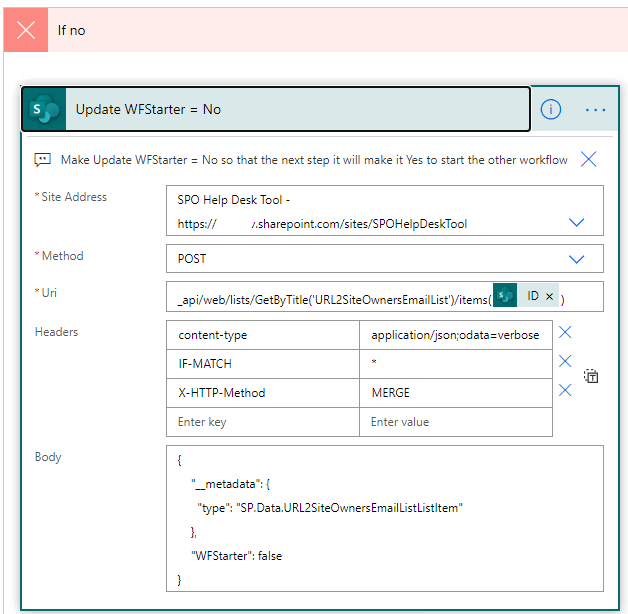
  1. If the condition is true then do nothing as the default WFStarter is No. But if the condition is false that means the flag was turned Yes, we need to make the flag WFStarter =No. Here is the Send HTTP to SharePoint actions.
  2. If the condition is true then do nothing as the default WFStarter is No. But if the condition is false that means the flag was turned Yes, we need to make the flag WFStarter =No. Here is the Send HTTP to SharePoint actions.
“Send an HTTP request to SharePoint” action to make the WFStarter Flag to false
_api/web/lists/GetByTitle('URL2SiteOwnersEmailList')/items('Apply_to_each)?['ID'])
# Headers
{
"content-type": "application/json;odata=verbose",
"IF-MATCH": "*",
"X-HTTP-Method": "MERGE"
}
#Note: Change the list name.
{
"_metadata": {
"type":"SP.Data.URL2SiteOwnersEmailListListItem"
},
"WFStarter":false
}
  1. Add one more “Send an HTTP request to SharePoint action with every this as shown above except make sure your WFStarter is true.

Now the second workflow with item modified event trigger.

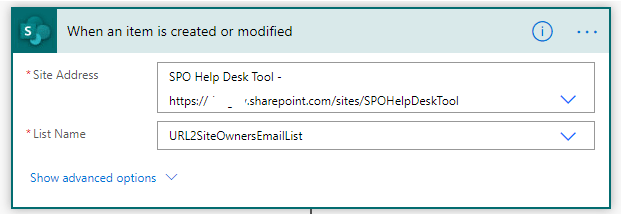
  1. Add When an item is created or modified trigger.
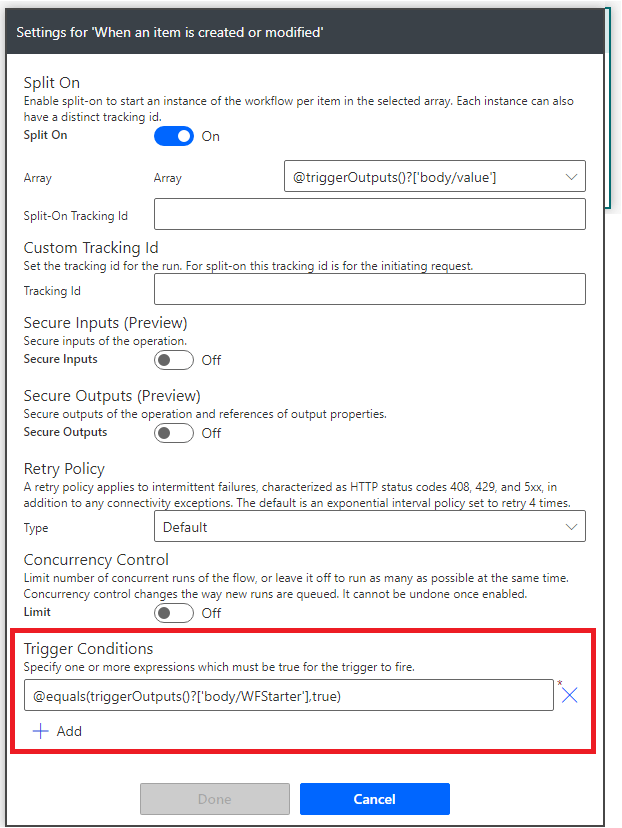
  1. Click on the “…” and “Settings” and make sure your Trigger Conditions is set to the following.
    @equals(triggerOutputs()?[‘body/WFStarter’],true)
    This will make sure the trigger fires only when items is modified for WFStarter=True (aka Yes). For any other items modification trigger will not fire.

A Tigger Conditions

Posted in Power Automate, Uncategorized | Leave a comment

How to add carousal effect adaptive cards in Bot Framework Composer response for an array object result?

Problem statement

I had a requirement to show the following data returned from the JSON output in the Bot Framework Composer.

[
  {
    "name": "XYZ Clinic",
    "address": "6546 Some Steet",
    "city": "SomeCity",
    "state": "SomeState",
    "zip": "99999",
    "phone": "999-888-7777 ",
    "ApptTypeName": "PRIMARY CARE",
    "newWaitTime": 23.0
  },
  …
]

Solution

In the send response action here are the Adaptive card related response texts for the above array object. You would call the ResultActivity(objArrayResult).

#ResultThumbnailCard(resultObj)
[ThumbnailCard
    title = ${resultObj.name}
    subtitle = ${resultObj.ApptTypeName} ${resultObj.newWaitTime} days
    text = ${resultObj.address}, ${resultObj.city}, ${resultObj.state} - ${resultObj.zip} 
    image = https://picsum.photos/200/200
    buttons = tel://${resultObj.phone}
]

#ResultActivity(resultArrObj)
[Activity
name = An Example Name
Attachments = ${ foreach ( resultArrObj, x, ResultThumbnailCard(x) ) }  
AttachmentLayout = carousel
]
Posted in Uncategorized | 1 Comment

How to copy multi choice field in Power Automate?

Problem:

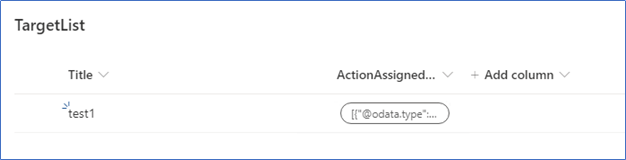
I have two lists with the same columns. When I use the Create Item action to copy an item from the Source list to the Target list I am not able to get a multiple choice column to populate correctly on the Target list. In the Target list entry, the ActionAssignedTo column returns OData information instead of the values (see below).

Do you know a trick to resolving this issue?

Steps to reproduce the problem.

  1. Create two lists (SourceList and TargetList) with the ActionAssignedTo Multi Choice field and default Title field.
  2. Create a Power Automate Flow with the Trigger “When an item created” on the Source List.
  3. Add the Create Item Action Like the following.

Note: If you add the ActionAssignedTo as a dynamic value it will always add “Apply Each” as this value is an JSON array object.

Resolution:

Note: The ActionAssignedTo field is a multi-choice field. The Trigger output has the values in a JSON array as shown below. Our aim to iterate the values and create another JSON array object.

We will make use of the SELECT action operation.

In the “From” type expression. triggerOutputs()?[‘body/ActionAssignedTo’]

In the Map below type expression. Item()?[‘Value’]

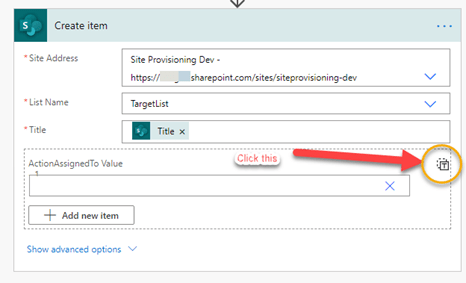
Now add the “Create item” action. Make sure you click on the icon below to turn in to adding expression.

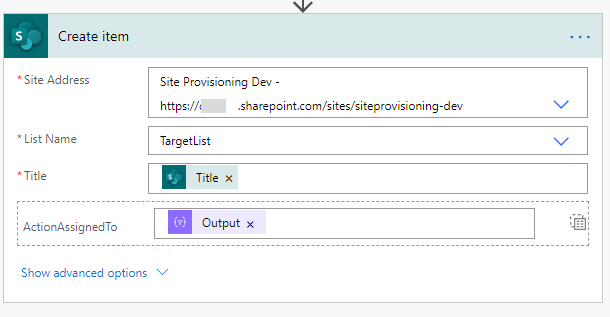
After you click that, now you add the output of the SELECT.

Conclusion:

The multi choice values come in as an array for you. To assign this value to create item you must make the values in the format the multi choice field desire. Once you reformat with SELECT the items can be easily assigned to be copied.

Posted in Power Automate | 1 Comment

How to send as a one email for multi people field in Power Automate?

Initial Setup

Create a list ‘TestFlow’ with a Title and a People field SecondarySiteOwners. Note: Make sure you set the Allow multiple selection

Create a Flow will the Item Added event trigger

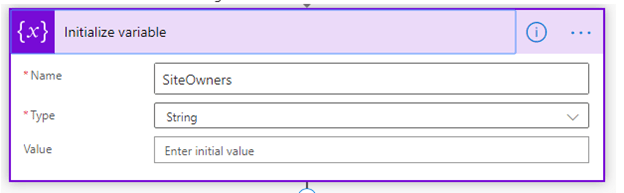
1: Add an action to initialize a String variable.

 2: Add an action to initialize an Array Variable.

3. Add Apply Each loop to loop though the Secondary Site Owners. In the inner action add an action to append array,

Note: in the Value fill the following expression.

items(‘Apply_to_each’)?[‘Email’]

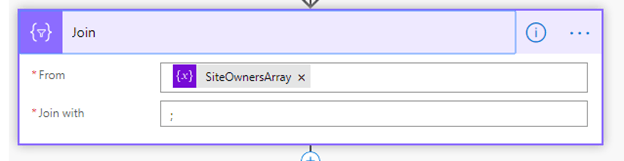
4. Now do the join in the array variable with the join character as ‘;’ (semicolon).

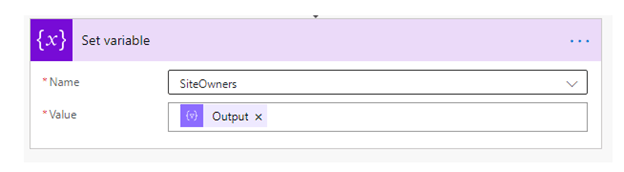
5. Now assign the new output of Join to the String variable for you to use to add to CC or TO line of your email.

Now your ‘SiteOwners’ String variables will have the following values with ‘;’ delimited string.

“AdeleV@M365x146530.OnMicrosoft.com;DebraB@M365x146530.OnMicrosoft.com;DiegoS@M365x146530.OnMicrosoft.com”

Happy Coding!

Posted in Power Automate | 1 Comment

How to put a trigger condition to your trigger in Power Automate?

Problem Definition:

Usually we have Triggers such as “Item Added or Modified” for a list or library. This is a first action in your workflow. Now assume that there is “WaveStatus” field in your list. You want a condition in your Trigger to activate only when Status is equals to “Completed”.

(Assuming your WaveStatus field has “New”, “InProgress”, “Hold” and “Completed”)

The issue with this approach is your workflow will trigger for all conditions even if some made a change to “Hold” from some other values. Even worst the trigger will fire for any field change in your list item.

Solution:

TTP: Use a “Compose” Action and type a function triggerBody(). Run the once without any actions. Note the output of compose keep copy to understand what comes to your flow as an input. This will be in JSON, I suggest learning a high level anatomy of JSON.

  1. Click on the ‘…’ on your trigger and select ‘Settings’
  1. In the Settings dialog, you will be adding the Trigger Condition. Please make a note your expression must have ‘@’ character.

e.g. @equals( triggerBody()?[‘WaveStatus’]?[‘Value’],’Completed’)

Conclusion

This will allow your work flow to trigger only when item is modified with the value WaveStatus=’Completed’. This will prevent unnecessary workflow run.

Happy Coding!

Posted in Power Automate | Leave a comment

How to quickly deploy PnP component to your demo tenant?

Before you want to develop anything on SPFx component (Webparts or Extensions) I suggest check out two following links on the PnP Open Source. Look/find for the component which meets your need “as is” or if you want to extend the component.

https://aka.ms/spfx-webparts & https://aka.ms/spfx-extensions

To research the inner working of the component you can follow few simple steps to deploy the desired component to your demo tenant.

Step # 1: Fork the PnP repository of WebPart or Extensions based on the need.

https://github.com/pnp/sp-dev-fx-webparts/ OR https://github.com/pnp/sp-dev-fx-extensions/

Step # 2: Please add the following two secret variables.

adminUsername = admin@{TENANTNAME].onmicrosoft.com
adminPassword = [your password]

Step # 3: In your new forked repository click on the Actions to create a new workflow. Copy the following content to the GitHub Actions YAML file.

https://raw.githubusercontent.com/pankajsurti/sp-dev-fx-webparts/master/.github/workflows/build-deploy-spfx-webparts.yml

Step # 4: Now look for the following line with the highlighted text and replace the sample name you want to deploy. e.g. the following setting will deploy ‘react-directory’.

SAMPLE_TO_BUILD_DEPLOY: './samples/react-directory'

Posted in Uncategorized | Leave a comment

How to do the SPFx CICD using GitHub Actions?

Summary

Use following very simple steps to get any PnP SPFx web part or extensions to your tenant using Github Actions.

I recommend use the following two links to get any sample code.

https://aka.ms/spfx-webparts

https://aka.ms/spfx-extensions

Prerequisite is that you have already cloned the PnP repo. Or if you like you can download the repo as a Zip file.

c:\PnPSPFX\>git clone https://github.com/pnp/sp-dev-fx-webparts.git

Step by Step Solution

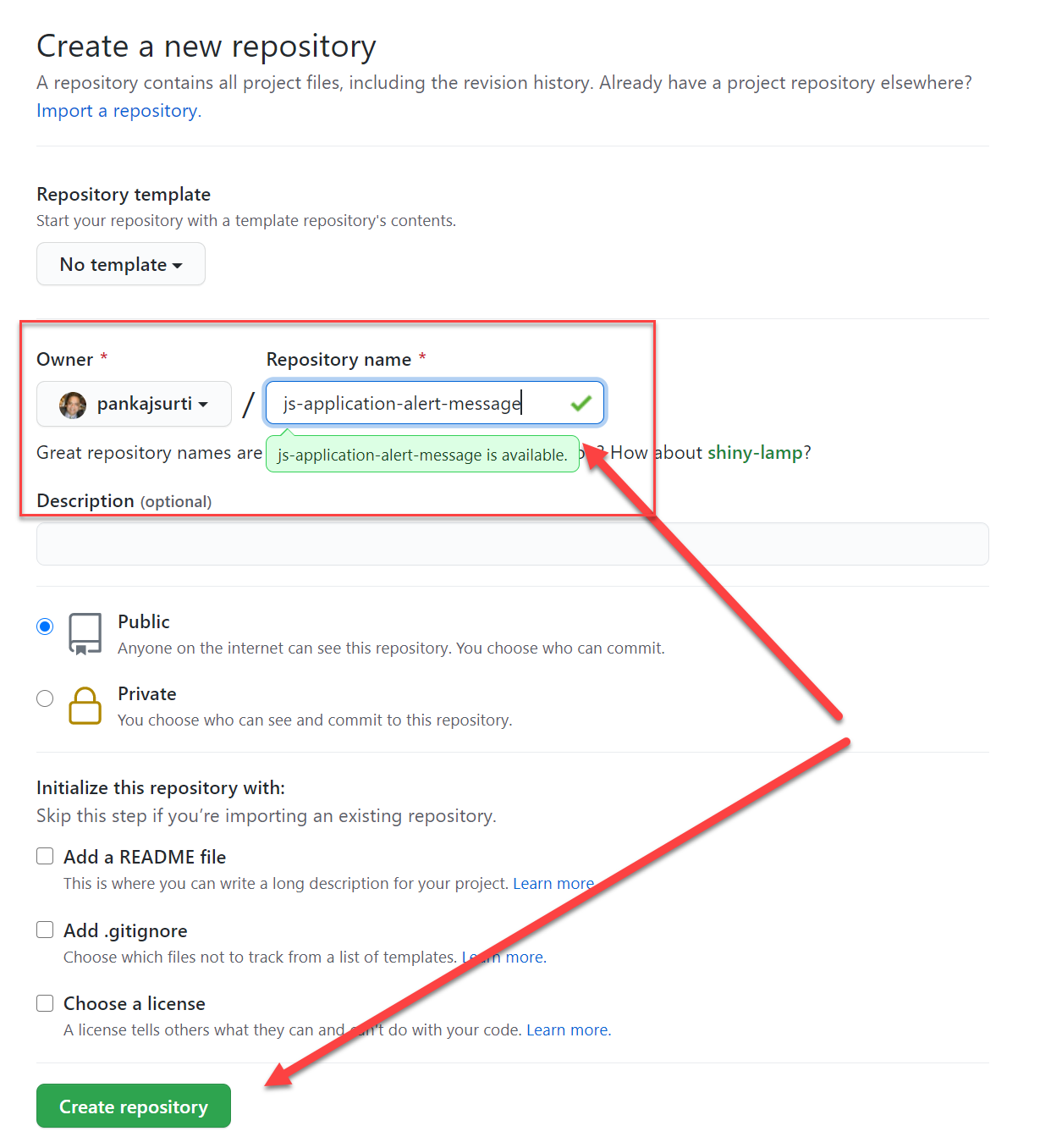
Step #1 Lets assume you want to get the “js-application-alert-message“. Create a Git Hub Repo.

Create a Git repo/

Step #2 Copy entire directory “js-application-alert-message” to a new location say ‘c:\demo\js-application-alert-message’ e.g.

xcopy react-application-festivals*.* c:\demo2\js-application-alert-message*.* /E /F

Step #3 Push the new directory with the code to the NEW GitHub repo using the following commands.

 git init
 git add *.*
 git commit -m "first draft"
 git remote add origin https://github.com/pankajsurti/react-application-festivals.git
 git push -u origin master 

Step #4 Your source in the GitHub repo. It is time for creating two new secrets.

adminUsername (I used the admin@[TENANT_NAME].onmicrosoft.com)

adminPassword (password for the tenant)

on your repo click on “Settings” then click on the “Secrets”.

Add above two new secrets.

Step #5 It is time to add the GitHub Actions Workflow.

Step #6 Check the build and deploy is complete.

Posted in SharePoint | Leave a comment

How to add a file to SPO using REST API?

Here is the PowerShell code for it.

## Replace bold letter with your environments.

$url = 'https://accounts.accesscontrol.windows.net/YOUR-TENANT-ID/tokens/OAuth/2'

$headers = @{
    'Content-Type' = 'application/x-www-form-urlencoded'
     'Accept' = '*/*'
}

$client_Id = 'YOUR-CLIENT-ID'
$client_secrect = 'YOUR-CLIENT-SECRET'
$TenantID = 'YOUR-TENANT-ID'
$TenantName ='YOUR-TENANT-NAME'

$body = $("grant_type=client_credentials&client_id={0}%40{1}&client_secret={2}%3D&resource=00000003-0000-0ff1-ce00-000000000000%2F{3}.sharepoint.com%40{4}" -f $client_Id,$TenantID,$client_secrect,$TenantName,$TenantID)

$item = Invoke-WebRequest -Method POST -Uri $url -Headers $headers -Body $body -UseBasicParsing

$response = ConvertFrom-Json $item

$url='https://YOUR-TENANT-NAME.sharepoint.com/sites/test123/_api/web/GetFolderByServerRelativePath(decodedurl=%27Shared Documents%27)/Files/add(url=%27NAME-OF_FILE.csv%27,overwrite=true)'

$headers = @{
'Authorization' = $("{0} {1}" -f $response.token_type,$response.access_token)
'Accept' = 'application/json; odata=verbose'
'Content-Type' = 'text/csv'
}
$r = Get-Content C:\0-VA\NAME-OF_FILE.csv | `
Invoke-WebRequest -Method POST -Uri $url -Headers $headers -UseBasicParsing

Note: To get client id and secret use the following link.

http://www.ktskumar.com/2017/01/access-sharepoint-online-using-postman/

Posted in SharePoint, SharePoint 2010, SharePoint 2013 | 1 Comment