
Summary
The customer requires a solution focused on SharePoint permissions. Specifically, the script is designed to identify sites that have the “Everyone except external users” permission applied. It will operate exclusively at the site level, reading permissions and reporting any sites where this specific permission is detected.

Step by Step Solution
Step # 1 Register a new application with a certificate and configure the following permission.
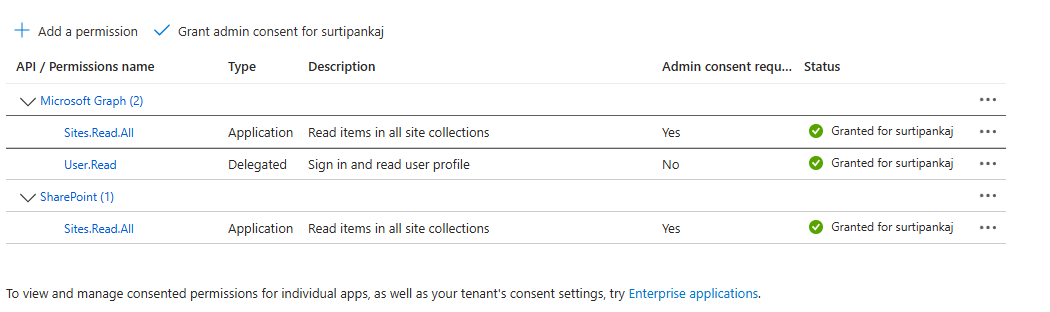
Step # 2 Execute the following PowerShell script to retrieve the required information.
$JobScriptBlock = {
    param(
        [string]$SPOSiteUrl,
        [string][Parameter(Mandatory = $true)]$OutputReportsFolderParameter,
        [string]$AppID,
        [string]$TenantID,
        [string]$CertThumbPrint
    )
    Import-Module Microsoft.Graph.Authentication

    # Extract host and site path from the SharePoint Web URL
    $uri            = [Uri]$SPOSiteUrl
    $urihost        = $uri.Host

    $cert = Get-ChildItem -Path "Cert:\CurrentUser\My" | Where-Object { $_.Thumbprint -eq $CertThumbPrint  }
    $accessToken = (Get-MsalToken -ClientId $AppID -TenantId $TenantID -ClientCertificate $cert -Scopes "https://$urihost/.default").AccessToken

    $restUrl = "$SPOSiteUrl/_api/web/sitegroups"
    $response = Invoke-RestMethod -Uri $restUrl -Method Get -Headers @{
        "Accept" = "application/json;odata=verbose"
        "Authorization" = "Bearer $accessToken"
    }
    $response.d.results | ForEach-Object {
        Write-Host "SPO Group: $($_.Title) ($($_.Id))"
        $spoGroupName = $_.Title
        $restUrl = "$SPOSiteUrl/_api/web/sitegroups($($_.Id))/users"
        $response = Invoke-RestMethod -Uri $restUrl -Method Get -Headers @{
            "Accept" = "application/json;odata=verbose"
            "Authorization" = "Bearer $accessToken"
        }
        # Output the users
        $response.d.results | ForEach-Object {
            #Write-Host "User: $($_.Title) ($($_.LoginName))"
            if ($_.LoginName -like "*spo-grid-all-users*") {
                if (-not $results) { $results = @() }
                $results += [PSCustomObject]@{
                    SiteUrl       = $SPOSiteUrl
                    GroupName     = $spoGroupName
                    UserTitle     = $_.Title
                }
                Write-Host "Found user with LoginName containing $($_.Title) in '$spoGroupName'"
            }
        }
    }
    # Output results to CSV
    if ($results.Count -gt 0) {
        $outputPath = Join-Path -Path $OutputReportsFolderParameter -ChildPath "SitesWithEveryoneExceptExternalUsers.csv"
        $results | Export-Csv -Path $outputPath -NoTypeInformation -Force -Append
    } else {
        Write-Host "No sites found with 'Everyone except external users' permissions."
    }


}

$jobParams = @{
    SPOSiteUrl                      = "https://surtipankaj.sharepoint.com/sites/test1200" # "https://surtipankaj.sharepoint.com/sites/test1"
    OutputReportsFolderParameter    = "C:\0-SRC\REPORTS\Output"
    AppID                           = "868d8147-66c9-4659-a935-27b03b3be1c0" #SPO-Report-Permissions
    TenantID                        = "1264183d-a35d-43db-a0c7-2f5f1247c7e5"
    CertThumbPrint                  = "409e6a95f1f4c9323eddca4807f9c8855f669cf9"
}
& $JobScriptBlock @jobParams
Conclusion
This script utilizes the SharePoint REST API to retrieve the necessary information efficiently. It helps eliminate confusion regarding how to access SharePoint groups, their users, and specific details as required by the customer


 Pankaj Surti's Blog