
Summary
The customer’s app required an UPN claim in the format of domain/samaccountname. Usually the UserPrincipal attribute is an email address. The customer has the hybrid identity and Active Directory is synched. The following technique can give you the domain/samaccountname claim.
Steps to add UPN attribute.
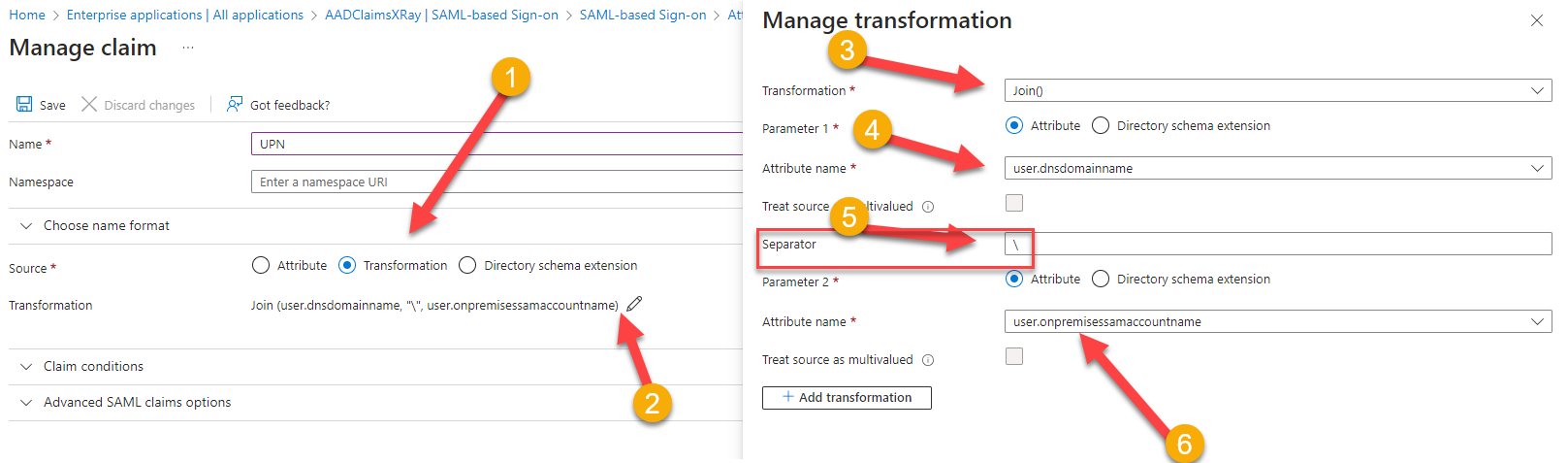
After adding a new attribute claim.
- Select the “Transformation”
- Click on the Edit icon.
- Select the Transformation method as “Join()”
- Select “user.dnsdomainname” attribute for the Parameter 1.
- In the Separator add the backslash “\”.
- Select “user.onprmeisessamaccountname” attribute for Parameter 2.
Conclusion
When you test this application in the ClaimsXray you will see the UPN as “Contoso\SurtiPankaj” i.e. “DomainName\UserName”.
ClaimsXRAY Tool Info.


 Pankaj Surti's Blog